Plots and profiles with a jump
PyOpenChannel draws its own charts as SVG files, with no plotting library. Each function in pyopenchannel.plot returns a figure: save it with .save("name.svg"), open it in the browser with .show(), or let a Jupyter notebook display it inline. SVG files stay sharp at any zoom and open in any browser.
The figures on this page were made by these functions (tools/make_doc_plots.py in the repository).
Profiles with a hydraulic jump
Below a sluice gate the flow leaves as a supercritical jet; further down, a weir or the tailwater holds the water at a subcritical depth. solve_profile_with_jump computes the supercritical curve downstream from the gate and the subcritical curve upstream from the weir, and puts the jump where the two depths are sequent (equal momentum, A·ȳ + Q²/gA).
import pyopenchannel as poc
from pyopenchannel import plot

reach = poc.solve_profile_with_jump(
    poc.RectangularChannel(width=5.0), discharge=20.0, slope=0.0004, manning_n=0.015,
    x_start=0.0, x_end=500.0,
    upstream_depth=0.35,     # jet below the gate (supercritical)
    downstream_depth=2.5,    # held by a weir (subcritical)
)

print(reach.message)         # Hydraulic jump at x = 23.64: 0.440 to 2.513
jump = reach.jump
print(jump.froude_number, jump.energy_loss, jump.length)   # 4.38, 2.02 m, 15.3 m

plot.profile(reach).save("profile.svg")
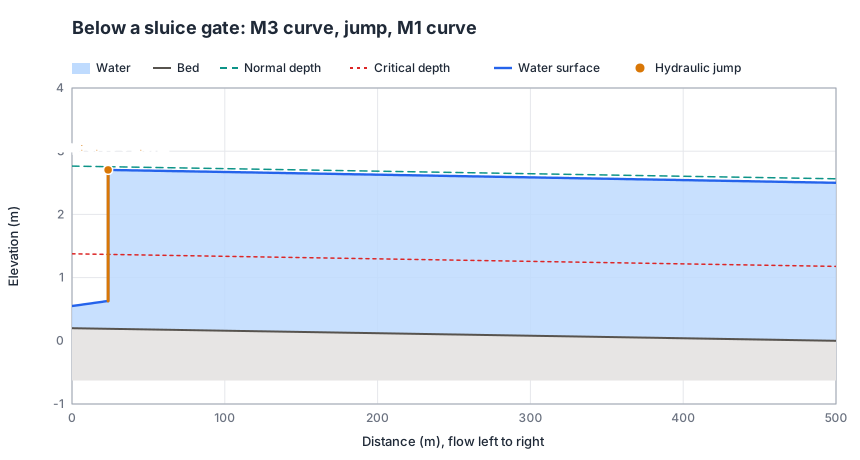
If the tailwater is high enough, the jump is drowned at the gate and the whole reach is subcritical; if the reach is too short for the jump, the supercritical flow sweeps it out downstream. The result's message and notes say which happened, and jump is None in both cases. The jump is drawn as a step at its toe; jump.length is about 6.1 times the sequent depth (USBR).
Water surface profiles
plot.profile accepts a profile from GVFSolver.solve_profile, a profile with a jump, or the result of DamAnalysis, BridgeAnalysis, ChuteAnalysis or ChannelTransition. It draws the bed, the water, normal and critical depth, and marks where a profile reached critical depth. Pass show_energy_line=True to add the energy grade line.
analysis = poc.DamAnalysis().analyze_backwater(
    poc.RectangularChannel(width=10.0), 30.0, 0.0008, 0.025, dam_height=2.0, analysis_distance=8000.0)
plot.profile(analysis, title="Dam backwater (M1 curve)").save("dam.svg")
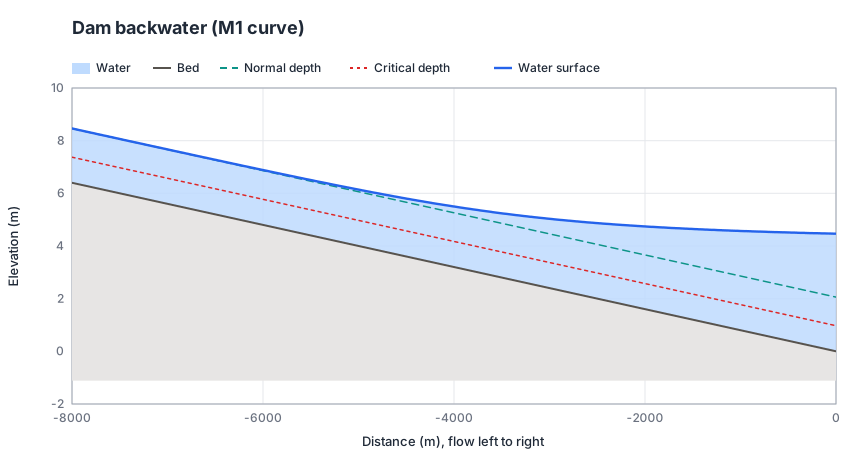
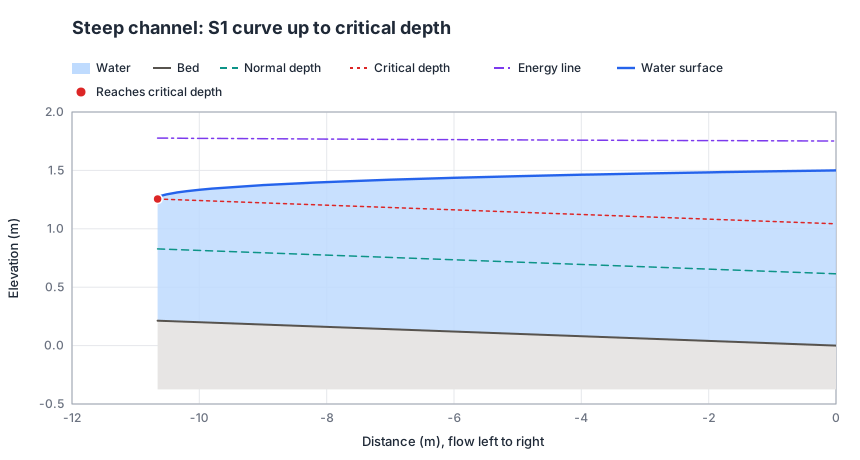
Profiles come with at least 200 points over the reach, so curves are smooth however far apart the solver's steps are.
Cross-sections
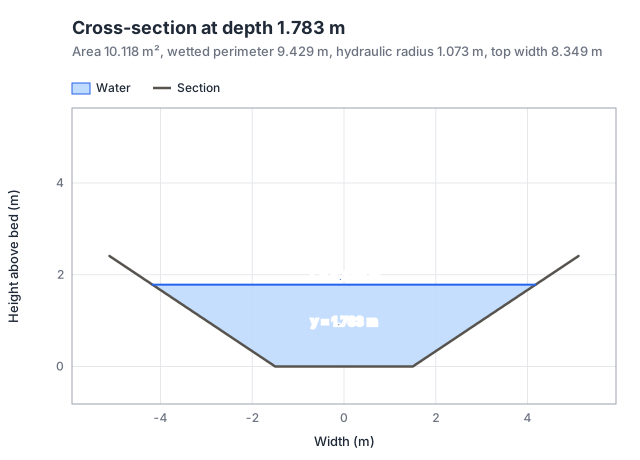
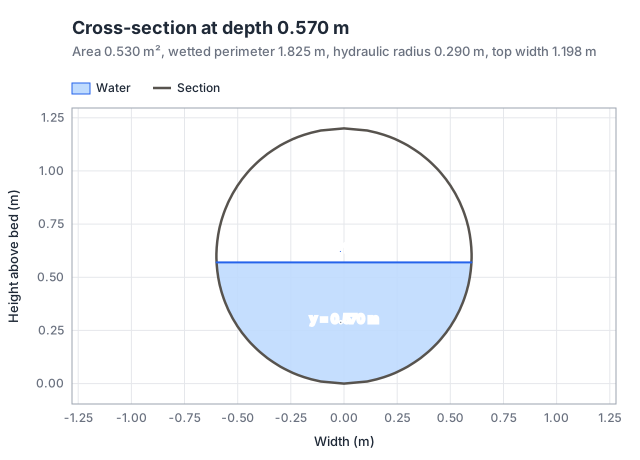
plot.cross_section(channel, depth) draws the section to scale with the water in it, and lists the area, wetted perimeter, hydraulic radius and top width.
Specific energy and rating curves
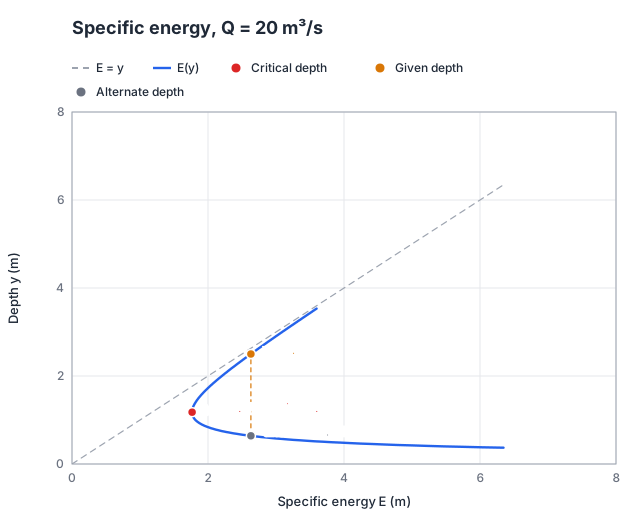
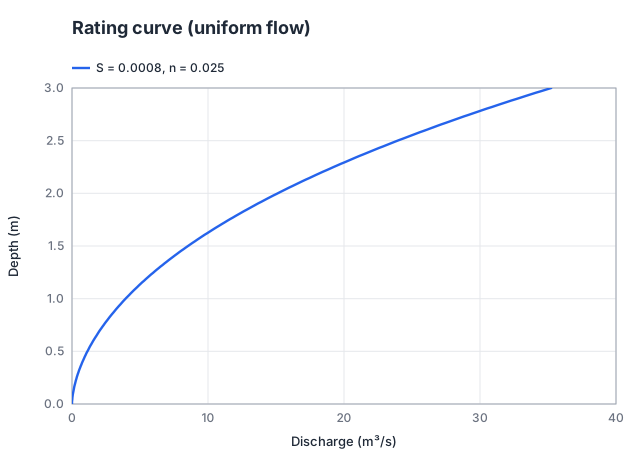
plot.specific_energy(channel, discharge, depth=None) draws E = y + Q²/(2gA²), marks critical depth and minimum energy and, if you give a depth, its alternate depth. plot.rating_curve(channel, slope, manning_n, max_depth) draws normal depth against discharge.
Units
Axis labels follow the unit system: metres and m³/s, or feet and ft³/s after poc.set_unit_system(poc.UnitSystem.US_CUSTOMARY).